
Not everyone knows that from IOS version 12.3(14)T, Cisco has introduced a new feature called NAT Virtual Interface; NVI removes the requirements to configure an interface as either NAT inside or NAT outside. An interface can be configured to use NAT or not use NAT.
How to use NVI? It’s easy! You must use the command ‘ip nat source …’ without specifying the inside/outside tag and enable the nat to the interfaces using the command ‘ip nat enable’.
For instance, if you use legacy statement:
Ciscozine(config)#interface range fastEthernet 0/0
Ciscozine(config-if-range)#ip nat inside

Ciscozine(config)#interface range fastEthernet 0/1
Ciscozine(config-if-range)#ip nat outside

Ciscozine(config)#ip nat inside source static 172.16.0.6 10.16.0.5
with NVI feature the nat will be:
Ciscozine(config)#interface range fastEthernet 0/0
Ciscozine(config-if-range)#ip nat enable

Ciscozine(config)#interface range fastEthernet 0/1
Ciscozine(config-if-range)#ip nat enable

Ciscozine(config)#ip nat source static 172.16.0.6 10.16.0.5
To better understand this feature, I will explain NVI using the same examples presented in the previous article ‘NAT and PAT: a complete explanation‘ (take no notice of the ip NAT inside/ouside in the images).
First of all, define which interfaces will take part in the IP translation; in these scenarios will be fastethernet 0/0 and fastethernet 0/1:
Ciscozine(config)#interface range fastEthernet 0/0 -1
Ciscozine(config-if-range)#ip nat enable
Then define the translation depending on the NAT/PAT used.
Example #1: Static NAT
How to translate the 172.16.0.5 IP address to the 10.16.0.5 ip address.
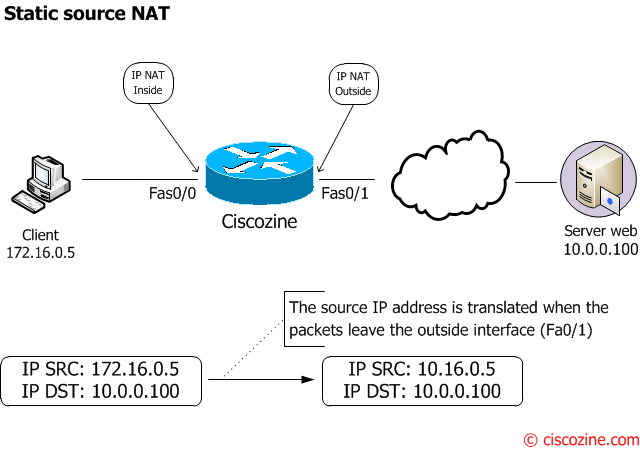
Define the static nat entry:
Ciscozine(config)#ip nat source static 172.16.0.6 10.16.0.5
Example #2: Dynamic NAT
How to translate the 172.16.0.0/28 network in the 10.16.0.0/29 network.
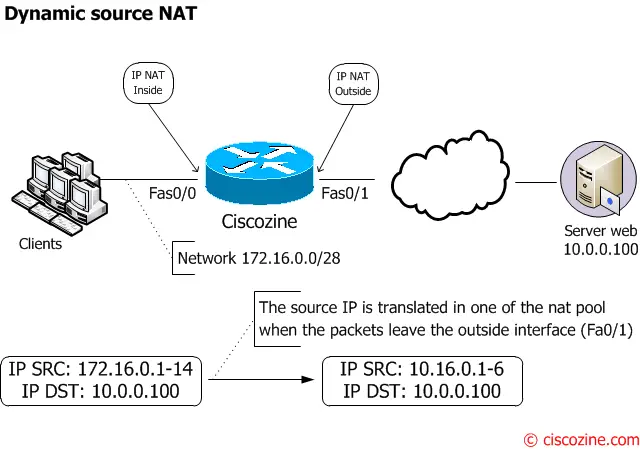
Like legacy nat, you need define three things.
Define the nat pool used in the nat translation (this is the same as in legacy nat):
Ciscozine(config)#ip nat pool dynamic-ip 10.0.16.1 10.0.16.6 prefix-length 29
Define which network will be translated (this is the same as in legacy nat):
Ciscozine(config)#ip access-list standard client-list
Ciscozine(config-std-nacl)#permit 172.16.0.0 0.0.0.15
Define the dynamic NAT:
Ciscozine(config)#ip nat source list client-list pool dynamic-ip
Example #3: Static PAT
How to expose two different services on Internet:
- The Web server (172.16.0.5) is listening on tcp port 80; this server responds on public address 88.88.88.88:80 from the Internet.
- The SSH server (172.16.0.6) is listening on tcp port 22; this server responds on public address 88.88.88.88:666 from the Internet.
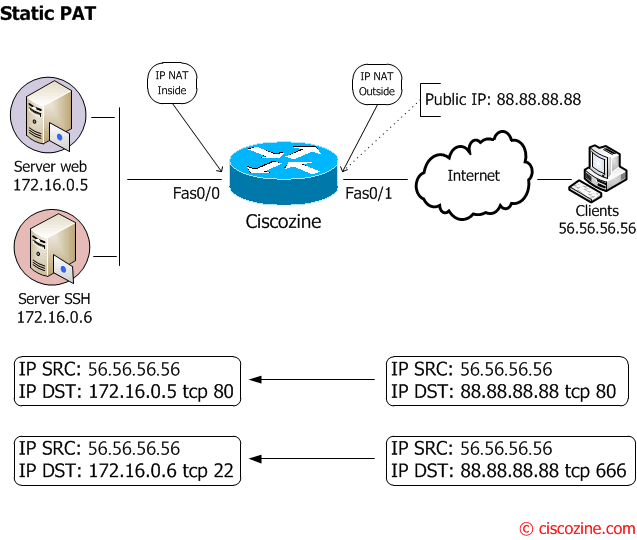
Define the static PAT:
Ciscozine(config)#ip nat source static tcp 172.17.0.5 80 88.88.88.88 80
Ciscozine(config)#ip nat source static tcp 172.17.0.6 22 88.88.88.88 666
Example #4: PAT – NAT Overload
How to share an Internet connection.
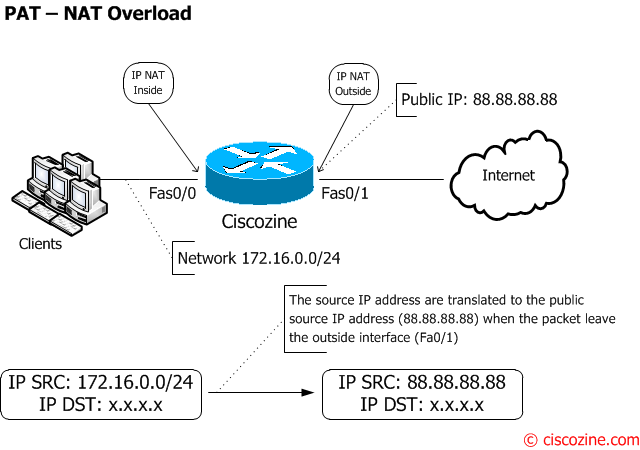
Define which network will be translated (this is the same as in legacy nat):
Ciscozine(config)#ip access-list standard client-list
Ciscozine(config-std-nacl)#permit 172.16.0.0 0.0.0.255
Define the NAT Overload:
Ciscozine(config)#ip nat source list client-list interface fastethernet0/1 overload
Note: The behavior of the NAT Virtual Interface is the same of the legacy nat; for these reasons:
- With static NAT, translation exists in the NAT translation table as soon as you configure static NAT command, and it remains in the translation table until you delete the static NAT command.
- With dynamic NAT, translations do not exist in the NAT table until the router receives traffic that requires translation.
- With static PAT, translation exists in the NAT translation table as soon as you configure static PAT command, and it remains in the translation table until you delete the static PAT command.
- With NAT overload, translations do not exist in the NAT table until the router receives traffic that requires translation.
To check NVI statistics and translations use these commands (observe the ‘nvi’ tag):
- show ip nat nvi translations
- show ip nat nvi statistics
Remember:
- When you enable NAT (legacy or not), the IOS enables a virtual interface called ‘NVI0’. This interface is used ONLY when the ‘ip nat enable’ is enabled. This interface can be found with the command ‘show ip interface brief’ or ‘show interfaces’.
- Cisco recommends to use legacy NAT for VRF to global NAT (ip nat inside/out) and between interfaces in the same VRF. NVI is used for NAT between different VRFs.
- Stateful Network Address Translation (SNAT) is not supported.
References:

too good keep going and pls make download as pdf option for all your post
HI.
Just like to check if NAT Overload, your missed out on the interface going out.
It should be:
cozine(config)#ip nat source list client-list interface fastethernet0/1 overload
good job dude…
try acrobat pro versions for converting webpage to pdf or might u also try web2pdf, a plugin compatible with google chrome browser, thanks.
Finally I learned about NVI.
THX!
Its too late to post some words, but I do realy appreciate your doc about NVI. Keep up sharing the knowledge. THANKS.