
I write this tutorial to show how it is simple wakup a PC through Internet using WOL feature.
What is WOL feature?
Wake-on-LAN (WOL) is an Ethernet computer networking standard that allows a computer to be turned on or woken up by a network message.
The message is usually sent by a program executed on another computer on the same local area network. It is also possible to initiate the message from another network by using Subnet directed broadcasts or a WOL gateway service. Wake-on-LAN is implemented using a special network message called a magic packet. The magic packet contains the MAC address of the destination computer. The listening computer waits for a magic packet addressed to it and then initiates system wake-up.
To enable WOL feature, you need:
Step #1: Enable WOL feature in your Bios. To more details check your guide.
Step #2: Download WOL software.
There are many WOL software (search with google…), but in this tutorial I use the Magic packet sender software (http://magicpacket.free.fr/).
Step #3: Find the Mac address of your PC
Step #4: Configure Cisco router
- Define a static arp entry
- Define a Port address translation (PAT)
Example
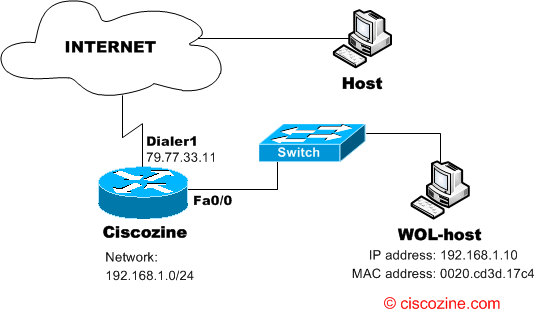
First of all, on the Ciscozine router define the entry:
arp 192.168.1.10 0020.cd3d.17c4 ARPA
Where 192.168.1.10 and 0020.cd3d.17c4 are the IP address and the MAC address of the PC to wake up.
Define a static pat translation:
ip nat inside source static udp 192.168.1.10 65535 interface Dialer1 7010
Now you can test the WOL feature: shutdown the WOL-host, open the magic sender software on the other host and configure it as you can see below:
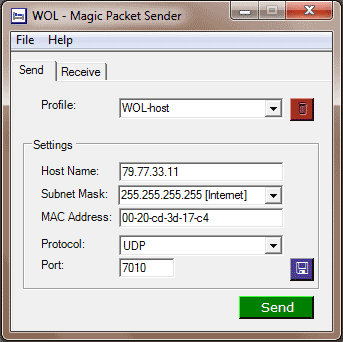
Then… press the “Send” button and your pc will wake up :)
Note: The switch does not required any additional configuration.
References:

Static ARP, of course!
I knew how to trigger it in the same subnet, but not from another network. Thanks for the information.
Greetings!
Or you could enable directed broadcast on the vlan the PC is on and just do a port forward to the broadcast address.
That way you don’t have to add static arps for every PC.