
VRF is an extension of IP routing that provides multiple routing instances. It provides a separate IP routing and forwarding table to each VPN and is used in concert with MP-iBGP (Multi-Protocol internal BGP) between provider equipment (PE) routers to provide Layer 3 MPLS-VPN. However, ML-Series VRF implementation is without MP-iBGP. With VRF Lite, the ML Series is considered a PE-extension or a customer equipment (CE)-extension. VRF Lite is considered a PE-extension since its has VRF (but without MP-iBGP), and it is considered a CE-extension since this CE can have multiple VRFs and serves many customer with one CE box.
VRF Lite means VRF without the need to run MPLS in the network. VRF Lite allows the network administrator to create multiple routing instances on the same routing device within the enterprise (for instance, it is possible assign the 10.0.0.1/30 IP address on two different interfaces). VRF Lite can be useful when you need to isolate traffic between two networks sharing the same routing platform or if you have multiple networks with overlapping addresses sharing the same physical network. Multiple instances of routing protocols can be used for different VRFs on the same device to exchange routes dynamically with a direct connected device.
Use VRF-lite features is quite simple; the basic configuration require two Cisco command:
- ip vrf vrf-name: make the instance of routing protocols.
- ip vrf forwarding vrf-name: associates the VRF-Lite with an interface or subinterface.
Example
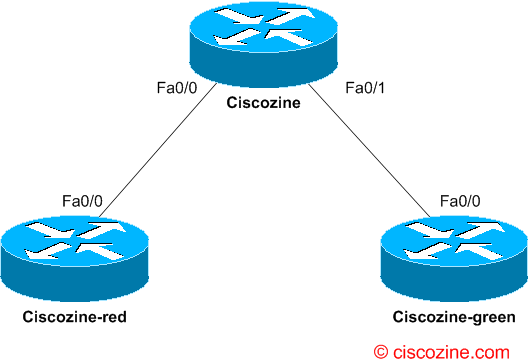
In this example I manage three different router:
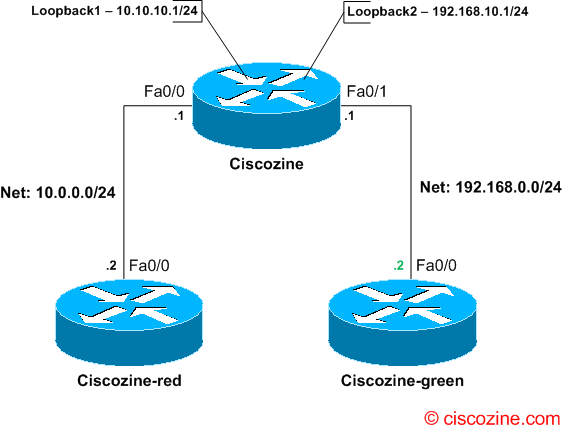
- ciscozine: the router with two instances of routing (based on VRF-Lite feature), named ‘RED’ and ‘GREEN’.
- ciscozine-red and ciscozine-green: two router connected to the ciscozine router without the VRF-Lite feature.
Below the physical connection:
…the logical connection without VRF-Lite features (as you can see in the video, each host can ping the others).
…and the logical connection with the VRF-lite feature
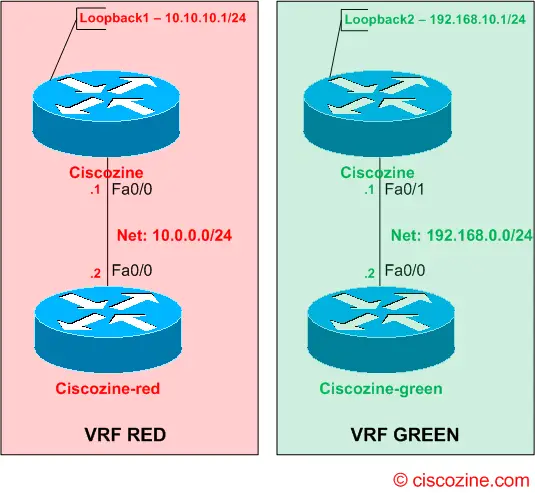
Use VRF-Lite on Ciscozine router is simple; it is required define two instances: RED and GREEN. The command to do it is: ip vrf ‘vrf-name‘. After that, it is needed ‘link’ the VRF-Lite to the interface using the command ip vrf forwarding ‘vrf-name’.
To understand the capability of the VRF-Lite see you the ping results:
From Ciscozine-red it is possible reach ONLY the interfaces that belong to the RED VRF, because the 10.0.0.1/24 interfaces (on Ciscozine router) belong to the RED instance:
Ciscozine-red#ping 10.0.0.1

Type escape sequence to abort.
Sending 5, 100-byte ICMP Echos to 10.0.0.1, timeout is 2 seconds:
!!!!!
Success rate is 100 percent (5/5), round-trip min/avg/max = 28/66/180 ms
Ciscozine-red#ping 10.10.10.1

Type escape sequence to abort.
Sending 5, 100-byte ICMP Echos to 10.10.10.1, timeout is 2 seconds:
.!!!!
Success rate is 80 percent (4/5), round-trip min/avg/max = 28/42/76 ms
Ciscozine-red#ping 192.168.0.1

Type escape sequence to abort.
Sending 5, 100-byte ICMP Echos to 192.168.0.1, timeout is 2 seconds:
.....
Success rate is 0 percent (0/5)
Ciscozine-red#ping 192.168.10.1

Type escape sequence to abort.
Sending 5, 100-byte ICMP Echos to 192.168.10.1, timeout is 2 seconds:
.....
Success rate is 0 percent (0/5)
Ciscozine-red#
From Ciscozine-green it is possible reach ONLY the interfaces that belong to the GREEN VRF, because the 192.168.0.1/24 interfaces (on Ciscozine router) belong to the GREEN instance:
Ciscozine-green#ping 192.168.10.1

Type escape sequence to abort.
Sending 5, 100-byte ICMP Echos to 192.168.10.1, timeout is 2 seconds:
.!!!!
Success rate is 80 percent (4/5), round-trip min/avg/max = 28/72/164 ms
Ciscozine-green#ping 192.168.0.1

Type escape sequence to abort.
Sending 5, 100-byte ICMP Echos to 192.168.0.1, timeout is 2 seconds:
.!!!!
Success rate is 80 percent (4/5), round-trip min/avg/max = 16/49/76 ms
Ciscozine-green#ping 10.10.10.1

Type escape sequence to abort.
Sending 5, 100-byte ICMP Echos to 10.10.10.1, timeout is 2 seconds:
.....
Success rate is 0 percent (0/5)
Ciscozine-green#
And what about Ciscozine router? On Ciscozine router is quite different test connectivity, due the VRF-Lite. To test the reachability, it is needed use the command ‘ping vrf vrf-name host’ instead of ‘ping host‘. As you can see below, multiple instances of routing protocols can be used for different VRFs on the same device:
Ciscozine#show ip route vrf RED

Routing Table: RED
Codes: C - connected, S - static, R - RIP, M - mobile, B - BGP
D - EIGRP, EX - EIGRP external, O - OSPF, IA - OSPF inter area
N1 - OSPF NSSA external type 1, N2 - OSPF NSSA external type 2
E1 - OSPF external type 1, E2 - OSPF external type 2
i - IS-IS, su - IS-IS summary, L1 - IS-IS level-1, L2 - IS-IS level-2
ia - IS-IS inter area, * - candidate default, U - per-user static route
o - ODR, P - periodic downloaded static route

Gateway of last resort is not set

10.0.0.0/24 is subnetted, 2 subnets
C       10.10.10.0 is directly connected, Loopback1
C       10.0.0.0 is directly connected, FastEthernet0/0

Ciscozine#show ip route vrf GREEN

Routing Table: GREEN
Codes: C - connected, S - static, R - RIP, M - mobile, B - BGP
D - EIGRP, EX - EIGRP external, O - OSPF, IA - OSPF inter area
N1 - OSPF NSSA external type 1, N2 - OSPF NSSA external type 2
E1 - OSPF external type 1, E2 - OSPF external type 2
i - IS-IS, su - IS-IS summary, L1 - IS-IS level-1, L2 - IS-IS level-2
ia - IS-IS inter area, * - candidate default, U - per-user static route
o - ODR, P - periodic downloaded static route

Gateway of last resort is not set

C    192.168.10.0/24 is directly connected, Loopback2
C    192.168.0.0/24 is directly connected, FastEthernet0/1
Ciscozine#

Ciscozine#ping vrf RED 10.0.0.2

Type escape sequence to abort.
Sending 5, 100-byte ICMP Echos to 10.0.0.2, timeout is 2 seconds:
!!!!!
Success rate is 100 percent (5/5), round-trip min/avg/max = 16/105/292 ms

Ciscozine#ping vrf RED 10.10.10.1

Type escape sequence to abort.
Sending 5, 100-byte ICMP Echos to 10.10.10.1, timeout is 2 seconds:
!!!!!
Success rate is 100 percent (5/5), round-trip min/avg/max = 1/3/4 ms

Ciscozine#ping vrf GREEN 192.168.0.2

Type escape sequence to abort.
Sending 5, 100-byte ICMP Echos to 192.168.0.2, timeout is 2 seconds:
!!!!!
Success rate is 100 percent (5/5), round-trip min/avg/max = 28/150/320 ms

Ciscozine#ping vrf GREEN 192.168.10.1

Type escape sequence to abort.
Sending 5, 100-byte ICMP Echos to 192.168.10.1, timeout is 2 seconds:
!!!!!
Success rate is 100 percent (5/5), round-trip min/avg/max = 1/2/4 ms

Ciscozine#ping vrf GREEN 10.0.0.2

Type escape sequence to abort.
Sending 5, 100-byte ICMP Echos to 10.0.0.2, timeout is 2 seconds:
.....
Success rate is 0 percent (0/5)

Ciscozine#ping vrf RED 192.168.0.2

Type escape sequence to abort.
Sending 5, 100-byte ICMP Echos to 192.168.0.2, timeout is 2 seconds:
.....
Success rate is 0 percent (0/5)
Ciscozine#
Below the real time example of the VRF-Lite:
Useful commands:
- show ip vrf: Displays the set of VRFs and interfaces.
- show ip route vrf vrf-name: Displays the IP routing table for a VRF.
- show ip protocols vrf vrf-name: Displays the routing protocol information for a VRF.
- ping vrf vrf-name ip-address: Pings an IP address that has a specific VRF.
Below the three running configuration:
Ciscozine-red#sh run
Building configuration...
Current configuration : 647 bytes
!
version 12.4
service timestamps debug datetime msec
service timestamps log datetime msec
no service password-encryption
!
hostname Ciscozine-red
!
boot-start-marker
boot-end-marker
!
!
no aaa new-model
memory-size iomem 10
ip cef
!
!
interface FastEthernet0/0
ip address 10.0.0.2 255.255.255.0
duplex auto
speed auto
!
interface FastEthernet0/1
no ip address
shutdown
duplex auto
speed auto
!
ip route 0.0.0.0 0.0.0.0 FastEthernet0/0
!
ip http server
!
!
control-plane
!
!
line con 0
exec-timeout 0 0
line aux 0
line vty 0 4
!
!
end

Ciscozine-red#

Ciscozine#sh run
Building configuration...
Current configuration : 859 bytes
!
version 12.4
service timestamps debug datetime msec
service timestamps log datetime msec
no service password-encryption
!
hostname Ciscozine
!
boot-start-marker
boot-end-marker
!
!
no aaa new-model
memory-size iomem 10
ip cef
!
!
!
!
ip vrf GREEN
!
ip vrf RED
!
!
interface Loopback1
ip vrf forwarding RED
ip address 10.10.10.1 255.255.255.0
!
interface Loopback2
ip vrf forwarding GREEN
ip address 192.168.10.1 255.255.255.0
!
interface FastEthernet0/0
ip vrf forwarding RED
ip address 10.0.0.1 255.255.255.0
duplex auto
speed auto
!
interface FastEthernet0/1
ip vrf forwarding GREEN
ip address 192.168.0.1 255.255.255.0
duplex auto
speed auto
!
!
ip http server
!
!
control-plane
!
!
line con 0
exec-timeout 0 0
line aux 0
line vty 0 4
!
!
end

Ciscozine#

Ciscozine-green#sh run
Building configuration...
Current configuration : 652 bytes
!
version 12.4
service timestamps debug datetime msec
service timestamps log datetime msec
no service password-encryption
!
hostname Ciscozine-green
!
boot-start-marker
boot-end-marker
!
!
no aaa new-model
memory-size iomem 10
ip cef
!
!
interface FastEthernet0/0
ip address 192.168.0.2 255.255.255.0
duplex auto
speed auto
!
interface FastEthernet0/1
no ip address
shutdown
duplex auto
speed auto
!
ip route 0.0.0.0 0.0.0.0 FastEthernet0/0
!
ip http server
!
!
control-plane
!
!
line con 0
exec-timeout 0 0
line aux 0
line vty 0 4
!
!
end

Ciscozine-green#
References:

Hi, I’m working at the time on a Hub-And-Spoke MPLS VPN and I can’t make it so one spoke site can reach the other one by going through the hubsite. I can’t find the right VRF system… Do you have any clues ?
Thanks !