
Not everyone knows that HSRP, a fault-tolerant default gateway protocol, has two versions: version 1 (the default) and version two. The second version was integrated from IOS Release 12.2(25)S.
HSRP Version 2 features:
- It advertises and learns millisecond timer values. This change ensures stability of the HSRP groups in all cases.
- It expands the group number range from 0 to 4095 and consequently uses a new MAC address range 0000.0C9F.F000 to 0000.0C9F.FFFF.
- It provides improved management and troubleshooting: the HSRP version 2 packet format includes a 6-byte identifier field that is used to uniquely identify the sender of the message. Typically, this field is populated with the interface MAC address.
- It uses the new IP multicast address 224.0.0.102 to send hello packets instead of the multicast address of 224.0.0.2, which is used by version 1. This new multicast address allows CGMP leave processing to be enabled at the same time as HSRP.
It’s really easy implement HSRP version 2; it is required to use only one command more than HSRP version 1: standby version 2. See below.
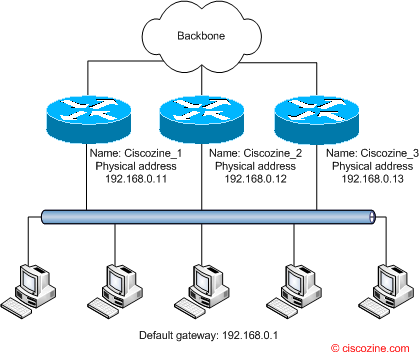
In this example, there are 3 routers connected to the local segment 192.168.0.0/24. These routers belong to the HSRP group number 1 and each physical interfaces have different ip address (192.168.0.11, 192.168.0.12, 192.168.0.13). The basic configuration is:
Ciscozine_1
Ciscozine_1#conf t
Ciscozine_1(config)#interface FastEthernet0/0
Ciscozine_1(config-if)#ip address 192.168.0.11 255.255.255.0
Ciscozine_1(config-if)#standby version 2
Ciscozine_1(config-if)#standby 1 ip 192.168.0.1
Ciscozine_2
Ciscozine_2#conf t
Ciscozine_2(config)#interface FastEthernet0/0
Ciscozine_2(config-if)#ip address 192.168.0.12 255.255.255.0
Ciscozine_2(config-if)#standby version 2
Ciscozine_2(config-if)#standby 1 ip 192.168.0.1
Ciscozine_3
Ciscozine_3#conf t
Ciscozine_3(config)#interface FastEthernet0/0
Ciscozine_3(config-if)#ip address 192.168.0.13 255.255.255.0
Ciscozine_3(config-if)#standby version 2
Ciscozine_3(config-if)#standby 1 ip 192.168.0.1
Remember: when you enable HSRP version 2, you can define the hello interval in milliseconds.
Router(config-if)#standby timers ?
  <1-254>  Hello interval in seconds
  msec     Specify hello interval in milliseconds
To display Hot Standby Router Protocol (HSRP) information, use the show standby command in privileged EXEC mode.
show standby [type number [group-number]] [active | init | listen | standby] [brief]
Syntax description:
- type number: (Optional) Interface type and number for which output is displayed.
- group-number: (Optional) Group number on the interface for which output is displayed.
- active: (Optional) Displays HSRP groups in the active state.
- init: (Optional) Displays HSRP groups in the initial state.
- listen: (Optional) Displays HSRP groups in the listen or learn state.
- standby: (Optional) Displays HSRP groups in the standby or speak state.
- brief: (Optional) Summarizes each standby group as a single line of output.
Remember: HSRP version 2 will not interoperate with HSRP version 1. An interface cannot operate both version 1 and version 2 because both versions are mutually exclusive.
References: http://www.cisco.com/…/feature/guide/gthsrpv2.html

Polo – that’s because your timers overlap, i.e. they both time out at exactly the sime time (3 x 100msec == 300msec).
Change them to 100msec and 250msec (or, what we use is 200msec and 750msec) and you will find it very fast.